Developer Quickstart: Fernfly From the OpenAI SDK, the AI SDK and LangChain
Every Fernfly project now has an OpenAI-compatible endpoint. Set the base URL in the OpenAI SDK, the Vercel AI SDK or LangChain, and your fine-tuned model's tool calls come back as tool_calls.
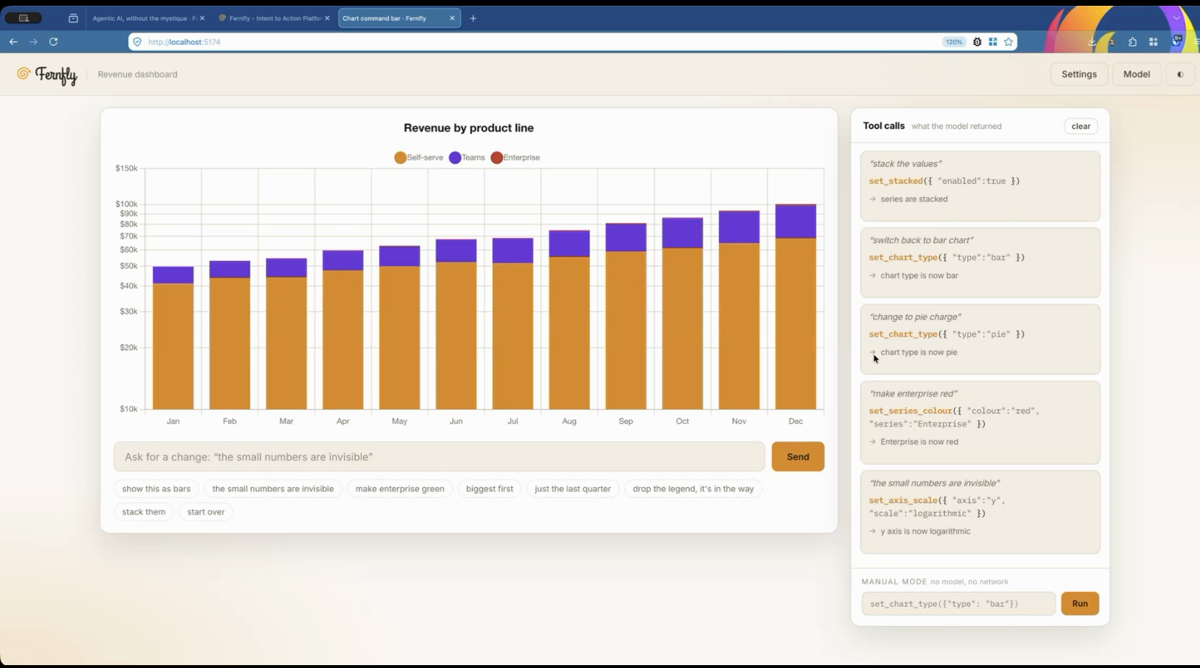
Every deployed Fernfly project now answers in the OpenAI Chat Completions format. Point the OpenAI SDK, the Vercel AI SDK or LangChain at your project, and your fine-tuned model's tool calls come back as tool_calls, which those SDKs already know how to handle. It works on every plan, Free included.
This post builds a working example on chart-command-bar, an open source revenue chart you change by typing a sentence, and calls its model from each SDK. The same steps are in the docs, under OpenAI SDK, AI SDK and LangChain.
What you need
A deployed Fernfly project and its API key. To follow along with the chart, train its model in Fernfly Studio:
- Download
tools.json, the chart's twelve tools, andpairs.jsonl, about 1,400 training pairs. - Choose New project, then From scratch, with Route Manifest as the source. Paste
tools.jsoninto Tools JSON and choose Extract routes. - On the Generate step, choose Import JSONL and pick
pairs.jsonl. - On the Train step, open Advanced mode, choose Fern Pinna (1.5B), and start training.
Studio deploys the model when training finishes and shows the project API key once. Save it, and copy the project id from the endpoint URL.
The three settings
Each SDK needs a base URL, a key and a model name:
| Setting | Value |
|---|---|
| Base URL | https://fernfly.com/api/p/<project-id>/v1 |
| API key | Your project API key |
| Model | fernfly. The project's newest deployment answers whatever the name. |
You don't send your tools. The model was trained on them, and the endpoint ignores any tools in the request. Set the key as an environment variable:
export FERNFLY_KEY=<your project API key>
OpenAI SDK
In Node.js:
import OpenAI from 'openai'

const fernfly = new OpenAI({
  baseURL: 'https://fernfly.com/api/p/<project-id>/v1',
  apiKey: process.env.FERNFLY_KEY,
})

const completion = await fernfly.chat.completions.create({
  model: 'fernfly',
  messages: [{ role: 'user', content: 'the small numbers are invisible' }],
})

for (const call of completion.choices[0].message.tool_calls ?? []) {
  console.log(call.function.name, JSON.parse(call.function.arguments))
}
// set_axis_scale { axis: 'y', scale: 'logarithmic' }
In Python:
import json
import os
from openai import OpenAI

fernfly = OpenAI(
    base_url="https://fernfly.com/api/p/<project-id>/v1",
    api_key=os.environ["FERNFLY_KEY"],
)

completion = fernfly.chat.completions.create(
    model="fernfly",
    messages=[{"role": "user", "content": "the small numbers are invisible"}],
)

for call in completion.choices[0].message.tool_calls or []:
    print(call.function.name, json.loads(call.function.arguments))
The sentence names no axis and no scale. The model maps it to a log scale on the y axis because the training pairs taught it to.
Vercel AI SDK
Install ai and @ai-sdk/openai-compatible. Unlike the OpenAI SDK, the AI SDK runs the tools for you, so give generateText your tools with an execute function each. Building them from tools.json keeps the names in step with the model's:
import { readFileSync } from 'node:fs'
import { createOpenAICompatible } from '@ai-sdk/openai-compatible'
import { generateText, jsonSchema, tool } from 'ai'

const fernfly = createOpenAICompatible({
  name: 'fernfly',
  baseURL: 'https://fernfly.com/api/p/<project-id>/v1',
  apiKey: process.env.FERNFLY_KEY,
})

const specs = JSON.parse(readFileSync('tools.json', 'utf8'))
const tools = Object.fromEntries(specs.map(spec => [spec.name, tool({
  description: spec.description,
  inputSchema: jsonSchema(spec.parameters),
  execute: async args => `${spec.name} ran with ${JSON.stringify(args)}`,
})]))

const { toolResults } = await generateText({
  model: fernfly('fernfly'),
  tools,
  prompt: 'make enterprise red',
})
console.log(toolResults.map(r => r.output))
// [ 'set_series_colour ran with {"colour":"red","series":"Enterprise"}' ]
In a real app, execute changes the chart. A call to a tool you didn't pass comes back marked invalid and isn't run.
streamText works the same way. If you set stopWhen to allow more steps, the SDK sends the tool results back to the endpoint, which ends the turn without calling the model again, so the loop stops after one round.
LangChain
In Python, install langchain-openai:
import os
from langchain_openai import ChatOpenAI

llm = ChatOpenAI(
    model="fernfly",
    base_url="https://fernfly.com/api/p/<project-id>/v1",
    api_key=os.environ["FERNFLY_KEY"],
)

message = llm.invoke("stack the values")
print(message.tool_calls)
# [{'name': 'set_stacked', 'args': {'enabled': True}, 'id': 'call_…', 'type': 'tool_call'}]
In JavaScript, install @langchain/openai and pass the base URL under configuration:
import { ChatOpenAI } from '@langchain/openai'

const llm = new ChatOpenAI({
  model: 'fernfly',
  apiKey: process.env.FERNFLY_KEY,
  configuration: { baseURL: 'https://fernfly.com/api/p/<project-id>/v1' },
})

const message = await llm.invoke('stack the values')
console.log(message.tool_calls)
tool_calls comes back without bind_tools, because the model already knows the tools. In an agent, pass your tools to the agent as usual. It runs the call, sends back the result and finishes after one round.
How the endpoint differs from OpenAI
A Fernfly model reads one request and returns the calls to make. It doesn't hold a conversation, so a few things work differently:
- It reads the last message. If the user sent it, its text is what the model reads. Earlier messages are ignored.
- A tool result ends the turn. When the last message is a tool result, the endpoint answers with an empty reply and doesn't call the model. This is what stops agent loops after one round.
- A request outside your tools gets text back. "What's the weather in New York?" has nothing to do with the chart, so the reply is text with
finish_reason"stop"and no tool calls. - A related request the model can't turn into a call comes back empty. "Why did sales drop last quarter?" is about the chart's data, which no tool can answer. If the project's AI fallback is on, the reply carries the fallback's calls instead.
- There is no
usage. Each request counts once toward your plan's daily requests, whatever its length. Afernflyobject in the response carries the request'slog_ref, its latency and the native endpoint's flags.
Errors use OpenAI's format, so each SDK raises its usual error type. The docs page lists them.
Run it yourself
The chart is at antelligent-org/chart-command-bar. It is plain HTML and JavaScript and calls the native endpoint from the browser, where the project allows keyless calls from its own address. The SDK examples above run on a server with the project key, against the same model.
We tested the examples with openai 7.60 and 3.55 (Node.js and Python), ai 7.0 with @ai-sdk/openai-compatible 3.0, @langchain/openai 1.8 and langchain-openai 1.8. The endpoint reference, with every request field and error, is OpenAI SDK, AI SDK and LangChain in the docs.

Anurag (aka `AnuRock`) leads tech and engineering at Fernfly, where he builds the platform that turns natural language into reliable tool calls. He aspires to be the dark lord of AI agents of the world one day.
LinkedIn