Chatbots That Do Things: Meet Woobert, a Command Bar for WooCommerce
Most AI chatbots talk. The useful ones do things. Woobert is a ⌘K / Ctrl-K command bar that turns a merchant's plain-English request into the right WooCommerce action, and runs it, on a small specialized Fern model.
[July 24, 2026]: Woobert is now Hoobert have been renamed to avoid confusion with the WooCommerce brand. The product is unchanged. All links below still work via redirects.
Three weeks ago Gaurav argued that most AI work isn't reasoning - it's the repeatable 80%, and paying frontier prices for it is a habit. Two weeks ago I put that claim in the open with the Playground: a small model and GPT-4o turning the same intent into the same tool call, side by side, scored honestly.
This week I want to show what the argument is for. Not a benchmark. A product you can install and use.
TL;DR. Woobert is a command bar for WooCommerce merchants. Press ⌘K (macOS) or Ctrl-K (Windows) anywhere in your store admin, type "refund order 1042" or "who are my top customers this month," and Woobert turns it into the right WooCommerce action and runs it - in well under a second and a half, on a small, specialized Fern model. There's a one-click browser demo, and you can wire it to a model you build yourself on Fernfly in a few minutes.
Most chatbots talk. The valuable ones do.
Almost every "AI chatbot" bolted onto a product is a talker. You ask it something, it writes you a paragraph, and then you go do the thing. That's the easy 20% dressed up as progress. The part that actually earns its keep is the other 80%: look up the order, start the return, book the slot, update the ticket. Do the right thing, reliably, and get out of the way.
That is a different job, and it rewards a different kind of model. Not a giant general reasoner improvising prose, but a small one specialized to your store's actions - one that maps each message to a concrete call and never wanders off into a creative-writing tangent, because it can't. The "chat" most bots over-invest in is the part that matters least.
Meet Woobert
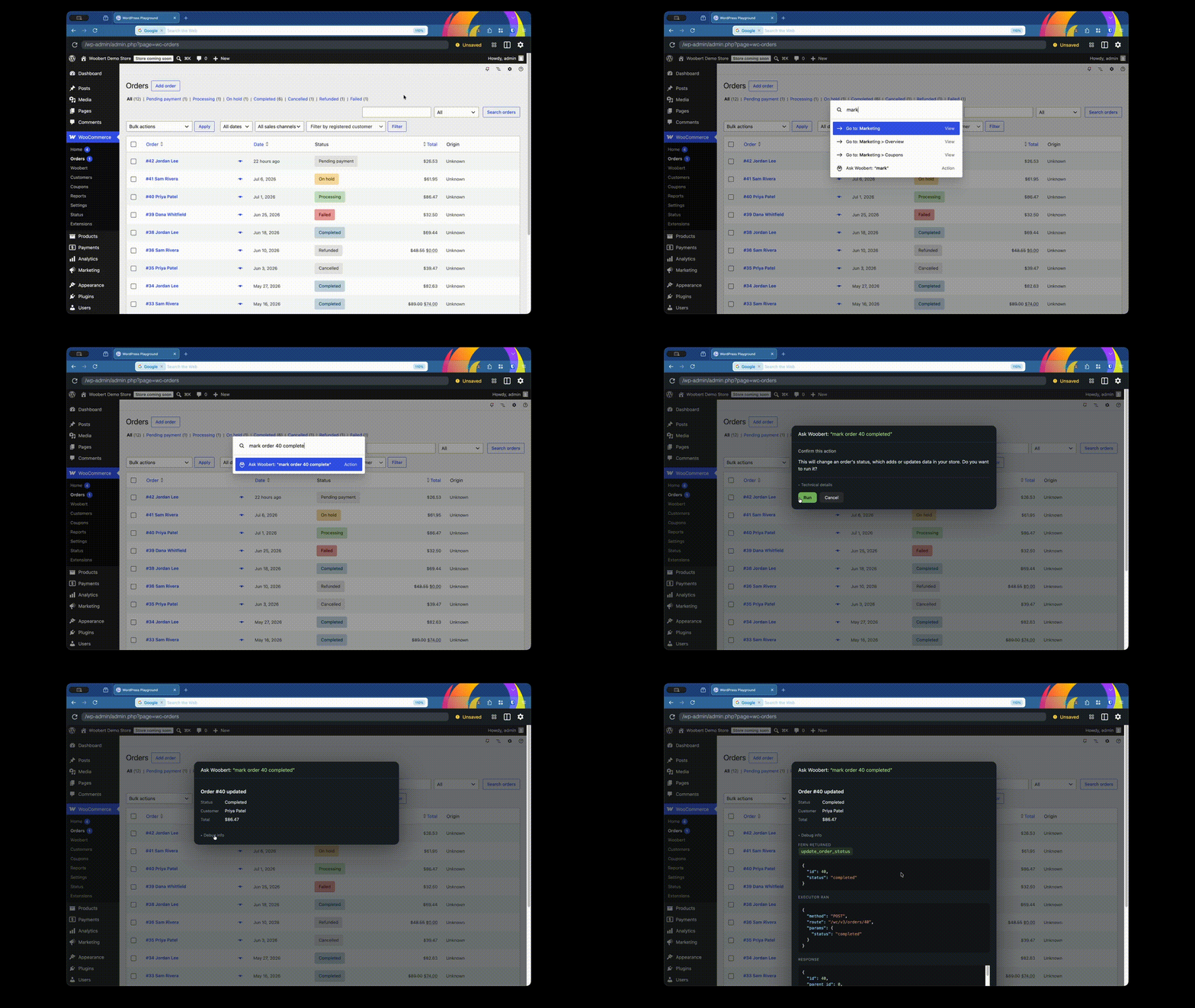
Woobert lives inside WordPress's native ⌘K command palette. A merchant presses ⌘K (or Ctrl-K) anywhere in wp-admin, picks Ask Woobert, and types what they want:
- "refund order 38 by $20, damaged item"
- "mark order 41 completed"
- "make a 20 percent coupon SUMMER20, minimum order 50"
- "who are my top customers by total spend"
Woobert reads the intent, picks the right action from a fixed set of store operations, fills the arguments, and runs it against the WooCommerce REST API. No menu-diving, no remembering which of six screens holds the setting. The natural-language request is the interface.
Why this is the 80% argument made real
Under the hood, Woobert is the whole thesis in one product:
- It commits to an action, not a paragraph. Every request resolves to a structured call -
refund_order,update_order_status,create_coupon- with the arguments in the right slots. There's nothing to copy-paste or interpret. - It's fast because it's small. A specialized Fern model answers in under a second and a half, so the command bar feels like part of the admin, not a trip to someone else's datacenter.
- It can't wander off the schema. The model only knows the store's ~28 actions. It cannot hallucinate a capability that doesn't exist, because "free-form" was never on the menu.
- It resolves, then executes, and confirms the scary stuff. Woobert previews the action it chose before running it, and anything destructive - refunds, deletes, status changes - needs a confirm click. Every executed command is written to a store-wide audit log.
- No keys in the browser. A server-side proxy holds the inference key and runs each call under the admin's own WooCommerce permissions. The front-end never sees a credential.
None of that needs a frontier model. It needs the right model, pointed at a bounded set of actions and trained to hit them every time.
Try it in your browser, no install
The fastest way to feel it is the one-click demo. It spins up a throwaway WordPress store - WooCommerce installed, sample products and orders seeded, Woobert already active - entirely in your browser, using WordPress Playground. Nothing to download, and the whole thing evaporates when you close the tab.
Launch the Woobert demo store →
Once it loads, press ⌘K and start asking. To make Woobert actually run commands, it needs to talk to a Fern model - which is the fun part, because you can build that model yourself.
Build the model behind it in a few minutes
Woobert is just a client. The brains - the model that turns "refund order 38" into the right call - is a project you create and own on Fernfly. We've made it a one-click template so you can experience the whole platform end to end:
- New project → pick the Woobert template. On the new-project screen, under How do you want to start?, choose Woobert · WooCommerce. It comes preloaded with the 28 store tools and 5,500+ training pairs, and skips you straight to training - no data to extract or generate.
- Train. Hit Start training. When it finishes, Fernfly auto-deploys the model and mints a stable endpoint.
- Copy your credentials. The Deploy step shows your project's inference URL and API key. (The key is shown once - grab it.)
- Paste them into Woobert. In the demo store (or a real one), go to WooCommerce → Woobert, drop in the endpoint URL and API key, and save.
That's it. Woobert now answers on your model. Change the tools, retrain, and the command bar changes with it. Getting those credentials is the point: it's the shortest path from "read a blog post" to "I just built and shipped a working commerce agent."
The plugin, tool set, and demo blueprint are all open at github.com/antelligent-org/woobert.
The honest part
Woobert does not chat. Ask it to write your product descriptions or reason about your Q3 strategy and it will pick the wrong tool, because that's not the job it was built for - that's the genuine 20%, and it still belongs to a frontier model. What Woobert does is take the endless stream of small, concrete store operations and make them a sentence away, instantly, without ever leaving the schema.
That's the whole bet: small and specialized wins the 80% that most products waste a frontier model on. This is week three of building Fernfly in the open. Spin up the demo, wire it to a model you trained yourself, and tell me where it nails the action and where it slips.

Anurag (aka `AnuRock`) leads tech and engineering at Fernfly, where he builds the platform that turns natural language into reliable tool calls. He aspires to be the dark lord of AI agents of the world one day.
LinkedIn