One URL, One Working Chatbot
Part two of the agentic AI webinar: we paste a website address on stage and, ten minutes later, a chat widget is navigating that site and flipping its theme. Every step shown, including the wait.
Part one argued that an agent is a goal, a set of tools, and a loop, and that the model inside one should be far smaller than you think. Arguing is easy. This is the part of the webinar where we had to show it.
We paste a website address into Fernfly and let the room watch the whole thing run: crawl, tool list, training data, a real fine-tuning job, a deployed endpoint, and a chat widget that works the page instead of describing it.
TL;DR. Paste a URL. Fernfly crawls the site, turns it into a list of things a visitor can do, writes the thousand sloppy ways people ask for each one, fine-tunes a small model on those pairs, and hands back an endpoint and an embed snippet. On
mozilla.orgthat came to 25 tools and 1,344 training pairs, trained in 840 steps. The widget then navigates and switches theme on a live page, in a bubble you paste in before</body>.
Five steps, and none of them are magic
The wizard names its own steps as it goes, which is the point. Nothing here is a black box with a progress bar in front of it:
- Source. You hand it an address.
- Extract. "Finding what your site can do."
- Generate. "Teaching your chatbot to understand visitors."
- Train. "Training your chatbot. This is the longest step."
- Deploy. The model goes live and you land on your embed code.
Those are the same five steps you would do by hand with your own tooling, in the same order. The product is not a different technique, it is the technique with the seams closed.
What it found on mozilla.org
We pointed it at mozilla.org, a site none of us control, because a demo on your own site is not a demo. The crawl came back with 25 tools:
set_theme(theme)             1 arg
set_text_size(size)          1 arg
toggle_contrast()            0 args
scroll_to_section(heading)   1 arg
navigate_home()              0 args
navigate_products()          0 args
navigate_mozilla_vpn()       0 args
navigate_about()             0 args
navigate_manifesto()         0 args
navigate_contribute()        0 args
navigate_privacy_notice()    0 args
…
Look at what those are not. They are not page summaries, and they are not FAQ entries. They are functions with names and typed arguments, the same shape as the create_refund we spent part one on. A website turns out to be a tool source in exactly the way an OpenAPI spec is.
The step everyone underestimates
Then the tool list becomes 1,344 training pairs, and this is the part of segment worth rewinding.
Here is what the generator wrote for one single tool, navigate_about:
| Input | Output |
|---|---|
| about | navigate_about({}) |
| go to about | navigate_about({}) |
| show about | navigate_about({}) |
| about page | navigate_about({}) |
| open about | navigate_about({}) |
| take me to about | navigate_about({}) |
| jump to about | navigate_about({}) |
| about us page | navigate_about({}) |
| explore about | navigate_about({}) |
| about portal | navigate_about({}) |
Fourteen of those, for one tool with no arguments. That is not padding. Every one of them is a real thing somebody types, and a model that has only seen navigate to the about page will fumble about portal.
This is the fine-tuning argument from part one, made concrete: RAG is for what the model doesn't know, fine-tuning is for how it should behave. Nothing retrieved at inference time teaches a model that "about portal" is a navigation intent. Thousands of examples do.
The training run itself was undramatic, which is the good outcome: 840 steps, 5 epochs, final loss 0.0001.
What you get at the end
Two endpoints, and the difference matters:
- Stable. Always routes to the project's current deployment. This is the one you put in your app.
- Versioned. Pinned to one deployment, so a retrain cannot change its behaviour underneath you.
Plus an API key, a Try-it box, and a set of automated tests you can run against the deployment before you trust it with anything.
The snippet, and the one setting that matters
Integration is one snippet before </body>. It draws the bubble, calls your model, and fires a fernfly:action event for every tool call, so your page decides what each action does. Navigation and theme are handled by the defaults, which is why the mozilla.org build worked with nothing written by hand.
The setting to actually stop and read is Sites allowed to use this chatbot. A browser widget cannot hold a secret, so the snippet in your page source is public by construction. The allow-list is what stops somebody lifting it onto their own site and spending your model on their traffic. Leave it empty and it defaults to the site the project was built from; www and bare forms both work.
We said this out loud in the room and will say it again here: do not put an API key in front-end code. The keyless endpoint plus an allow-list is the shape that is safe to publish.
Then it works the page
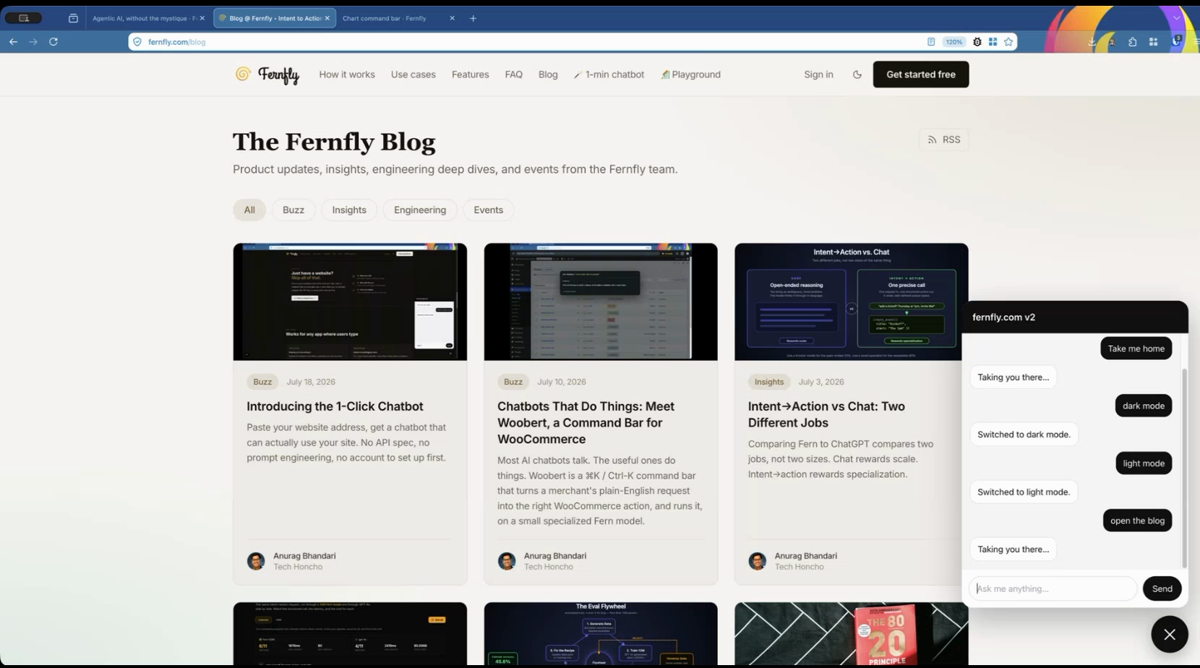
The last three minutes are the payoff, and they are best watched rather than read. The widget on our own blog, live:
| You type | It does |
|---|---|
| take me home | Taking you there. The page navigates. |
| dark mode | Switched to dark mode. The theme flips. |
| light mode | Switched to light mode. |
| open the blog | Taking you there. |
No paragraph explaining where the theme toggle lives. No "you can find that in settings". The request and the action are the same event.
One wrinkle worth knowing before you demo this to your own team: in the built-in preview the bot describes the action it would take ("in live mode, I would switch the theme to dark"), because the preview page is a stand-in and has nothing to navigate. On your real site it performs it. That difference has confused more than one person, including us.
What we did not hide
- Public pages only. Anything behind a login is invisible to the crawl.
- Training takes minutes, and there is no way around that. Keep the tab open.
- A one-page brochure site gives the model almost nothing to learn. The site has to do something.
- There is an AI fallback, on by default, that hands a request the small model could not turn into a tool call over to a larger one. It is a toggle. Turn it off and a missed request is logged for retraining instead of going anywhere, which is the setting you want if privacy is the reason you came.
- Ask for the thirteenth thing and it will miss. The model knows 25 tools. That is the trade, and part three is where we break one on purpose and leave it broken.
Coming next
The third and final segment: a Chart.js dashboard driven by a sentence. Twelve plain JavaScript functions, a tool list written by hand, and the forty lines of ordinary code that sit between the model and your app. It is the same five steps with the lid off, for when your tools are your own code rather than a website.
Until then: building one of these is free and it is one field away. If you want the longer written version of what the wizard is doing, that is Introducing the 1-Click Chatbot.
And if what you actually want is this shape pointed at a real product rather than a marketing site, Hoobert is the same idea wired into WooCommerce, with a one-click browser demo.

Anurag (aka `AnuRock`) leads tech and engineering at Fernfly, where he builds the platform that turns natural language into reliable tool calls. He aspires to be the dark lord of AI agents of the world one day.
LinkedIn