Twelve Functions and a Sentence
The last segment of the agentic AI webinar. A Chart.js dashboard driven by plain English, a tool list we wrote by hand, and the forty lines of ordinary code that sit between the model and the app.
Part one was the argument. Part two was the argument built in one field, on a website, in ten minutes.
This is the same five steps with the lid off. Your tools are usually not a website. They are functions you already wrote, sitting in your own codebase, and this segment is what that looks like end to end: a tool list written by hand, a model trained on it, and the ordinary code that takes what the model returns and actually runs it.
TL;DR. A revenue dashboard, twelve plain JavaScript functions, and a
tools.jsonof 7 KB. Fernfly turned that into 1,424 training pairs, fine-tuned a 1.5B model in 267 steps, and deployed it. Then "the small numbers are invisible" becameset_axis_scale({axis:"y", scale:"logarithmic"})and the chart redrew. The model never touches the chart. A forty-line file does, and that file is the whole security model.
The dashboard you have already used
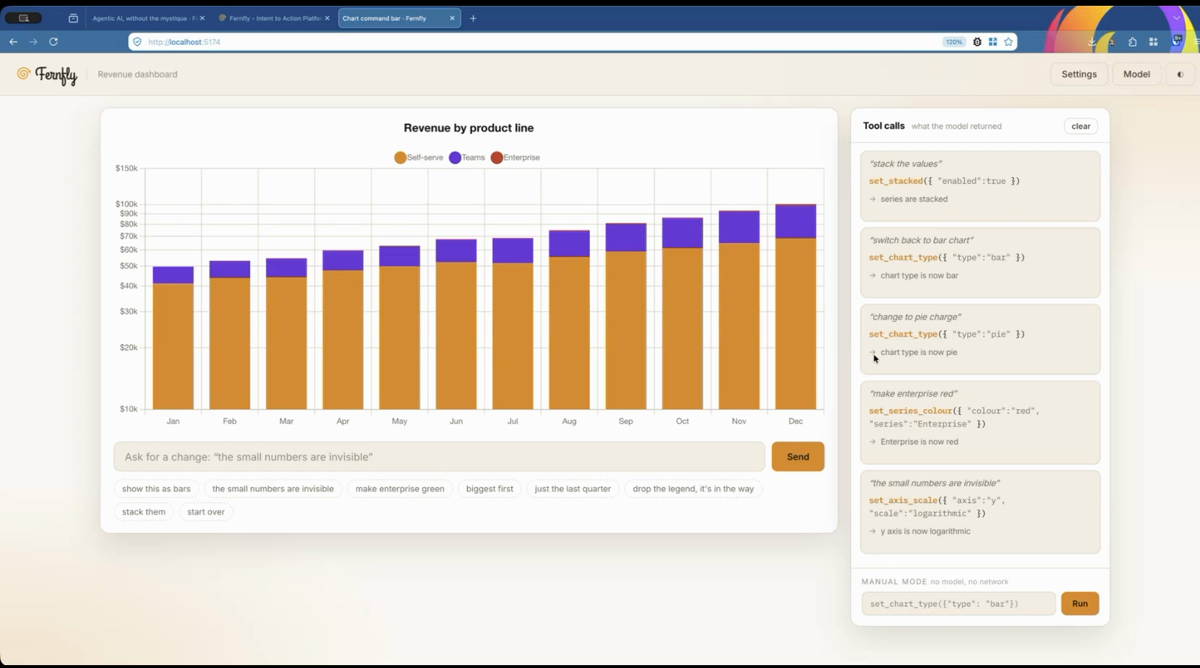
Revenue by product line. Twelve months, three series, and a settings panel with every control you need buried two menus deep. Everybody in the room recognised it, because every BI tool on earth has one and users find about six of the forty controls in it.
Everything in that panel is already a function. The segment puts a sentence in front of them.
The tool list is a file you write
Part two's tool list fell out of a crawl. Here there is no site to crawl, so we wrote it: tools.json, 7 KB, twelve tools, uploaded on the Source step as an OpenAPI spec.
set_chart_type(type)               "bar" | "line" | "pie" | "doughnut" | "radar"
set_axis_scale(axis, scale)        axis: "x" | "y"; scale: "linear" | "logarithmic"
set_series_colour(series, colour)
set_legend_position(position)      "top" | "bottom" | "left" | "right" | "hidden"
set_stacked(enabled)
sort_data(order)                   "asc" | "desc" | "original"
filter_months(from, to)            1-12
toggle_gridlines(axis, visible)
reset_chart()
…
Worth saying plainly on stage and worth repeating here: that file took about twenty minutes to write. Nobody believes the version where a spec falls out of the sky.
Look at set_chart_type. Five values in an enum, so the model cannot invent a sixth. Not because it is clever, but because the schema will not let it.
1,424 pairs, and a dial for how many
The Generate step is where the interesting choice lives, and it is the one part of the pipeline part two skipped past.
Two knobs. Utterance style is verbose or terse: verbose gets you free-flowing sentences and suits users who type whole requests, terse gets you slotted command-style phrasings and is usually better for a command bar. Pairs per tool is a straight trade of coverage against generation time:
| Templates × values | Per tool | |
|---|---|---|
| Quick test | 20 × 4 | ~80 |
| Baseline | 24 × 5 | ~120 |
| Recommended | 28 × 6 | ~168 |
| Maximum | 30 × 7 | ~210 |
We took the recommended setting and got 1,424 pairs out of twelve tools. That is the number everybody underestimates, and part two showed why: it takes fourteen phrasings of one intent before a model stops being surprised by the fifteenth.
Which model, and what it cost
Training offers an A100 GPU at roughly five minutes, included.
The base model is the choice that matters, and it is permanent for the life of the project:
- Fern Bud, 12M params. Fastest to train, lightest to run.
- Fern Pinnule, 160M. Better accuracy, slower both ways.
- Fern Pinna, 1.5B. Best accuracy, slowest.
We picked Fern Pinna. Twelve tools with real arguments, an axis name, an enum, a numeric range, a series matched loosely, is more slot-filling than a navigation-only chatbot, and it was worth the size.
Hyperparameters came pre-filled from the pair count: 3 epochs, batch size 16, learning rate 0.0002. The run finished at 267 steps, loss 0.0001. Then it deploys itself and hands you an endpoint.
The part nobody tells you
Here is the thing that surprises people, and it is the most useful thing in the segment.
The model does not call your code. It cannot. It reads a sentence, hands back a call as data, and then it is done. Something has to take that and act on it, and that something is ordinary software you write:
/** Execute one tool call. This is the whole of the "agent" that isn't the model. */
CCB.execute = function (call) {
  const tool = CCB.TOOLS[call && call.name];

  // The refusal branch. In production this is also where you would hand an
  // out-of-scope request off to a frontier model.
  if (!tool) {
    return { ok: false, note: `refused: ${JSON.stringify(call && call.name)} is not in the tool list` };
  }

  try {
    return { ok: true, note: tool(call.arguments || {}) };
  } catch (err) {
    if (err instanceof CCB.ToolError) return { ok: false, note: `refused: ${err.message}` };
    throw err;
  }
};
Four things about that, each one a callback to part one:
TOOLSis an allow-list, and that is the security model. A name that is not a key in that object cannot execute, whatever the model returns. Part one called the tool list a permission boundary. This is the line where that is true.- Validation lives here, not in the model. Every tool guards its own arguments the way you would guard a form field.
oneOf,clamp, a number parser that tolerates"50k"and"$1,200"because those are shapes models actually emit. A wrong answer becomes a no-op, not an exception. callsis an array. One sentence can legitimately produce two calls, which is why there is a loop and why the repaint sits outside it.- There is nothing AI about this file. It is a lookup table and a
forloop. You can test it, log it, and roll it back.
That snippet is trimmed. The whole thing is js/orchestrator.js, and the argument guards from point 2 are in js/tools.js. Between them they are under 300 lines including comments, and that is the entire agent minus the model.
That if (!tool) branch is also where the honest 20% goes. When you need the thirteenth verb, routing to a frontier model happens right there, on that line. Seeing the routing point as a real line of code lands better than any architecture diagram.
Talk to the chart
The payoff, straight out of the call log, unedited:
| You type | What came back | What happened |
|---|---|---|
| the small numbers are invisible | set_axis_scale({axis:"y", scale:"logarithmic"}) | y axis is now logarithmic |
| make enterprise red | set_series_colour({colour:"red", series:"Enterprise"}) | Enterprise is now red |
| change to pie charge | set_chart_type({type:"pie"}) | chart type is now pie |
| switch back to bar chart | set_chart_type({type:"bar"}) | chart type is now bar |
| stack the values | set_stacked({enabled:true}) | series are stacked |
"The small numbers are invisible" is the one to dwell on. There is no axis in that sentence, no scale, no jargon at all. It is a complaint. The model learned that this particular complaint maps to a log scale on the y axis, from the training pairs, and that is the entire argument for fine-tuning over prompting made visible in one line.
And look at row three. "Change to pie charge" is a typo, and it still landed on set_chart_type({type:"pie"}). That is not the model being clever. That is 1,424 examples of people phrasing things badly.
The honest part
- Ask for the thirteenth thing and it misses. "Why did revenue drop in March?" is not in the tool list, and the orchestrator refuses it because that name is not in the table. It is very good at twelve things and no use at all on the thirteenth.
- It does not reason about your data. It changes how the chart is drawn. Nothing in this pipeline looks at the numbers.
- The tool list is the work. Not the training, not the wiring. Twenty minutes of thinking about what your app can actually do, written down honestly.
- A 1.5B model costs slightly more to run than a 12M one. We chose accuracy here. Your dashboard may not need to.
Run it yourself
The dashboard is open source at antelligent-org/chart-command-bar. It is plain HTML, CSS, and JavaScript with a vendored copy of Chart.js, so there is no build and it works offline:
git clone https://github.com/antelligent-org/chart-command-bar
cd chart-command-bar
npm run vendor   # fetches Chart.js into vendor/
npm start        # http://localhost:5174
You do not need a model to poke at it. The second input runs a hand-typed call such as set_chart_type({"type":"bar"}) straight through the same executor, no network involved.
To wire up the sentence, press Model and paste a Fernfly project's inference URL. The project needs keyless public inference with http://localhost:5174 on its allowed origins, which is the shape from part two, and is why there is no API key anywhere in the front-end source.
The repo also ships pairs.jsonl, the ~1,400 seed training pairs, so you can read what the model actually learned from rather than take our word for it.
That is the series
Three segments, one argument:
- Agentic AI, Without the Mystique. What an agent is, why they fail at typing rather than thinking, and why the model inside one should be small.
- One URL, One Working Chatbot. The whole pipeline in one field, on a website.
- This one. The same pipeline when the tools are your own code.
If the three-question test from part one came back three yeses for something on your stack, the tool list is where you start. Write it by hand, honestly, and the rest is one field away.
For the same shape pointed at a real product rather than a demo, Hoobert is a command bar for WooCommerce merchants, with a one-click browser demo and a model you can train yourself.

Anurag (aka `AnuRock`) leads tech and engineering at Fernfly, where he builds the platform that turns natural language into reliable tool calls. He aspires to be the dark lord of AI agents of the world one day.
LinkedIn